


Snowflake’s virtual warehouses are the compute engine that powers every query, transformation, and ETL job. For years, we’ve run on what are now called Generation-1 Warehouses. With the release of Snowflake Gen 2 Warehouses, the natural question is:
Do these upgrades deliver better value — or do you just end up paying more credits?
Generation 2 promises faster CPUs, more memory bandwidth, better query execution, and improved concurrency. The reality: some workloads scream, others barely notice. Let’s break it down with benchmarks, costs, and best practices.
What Is a Snowflake Generation 2 Warehouse?
A Generation-2 Warehouse is not an entirely new type of warehouse in Snowflake; it is still considered a Standard warehouse. The difference lies in the upgraded hardware and the optimizations that operate behind the scenes. These improvements are paired with a smarter query engine designed to take advantage of the additional processing power and memory bandwidth.
As a result, workloads that involve large table scans, complex joins, or heavy aggregations are able to complete more quickly. The warehouse scheduler is also able to keep more CPU cores active simultaneously, which helps reduce idle time and increases overall throughput. Importantly, all of these enhancements happen transparently: you do not need to change your SQL code or make adjustments to your existing integrations in order to benefit from the performance gains.
In Summary:
Warehouse type: Is the same, it’s just a faster warehouse
Hardware: Is improved with faster CPUs, memory and cache improvements
Concurrency: Is improved, this means a single virtual warehouse can handle more concurrent queries without spinning up a new cluster using the Multi-Cluster feature.
Gen 1 vs Gen 2: Key Differences: Performance!
The difference between Generation 1 and Generation 2 Warehouses lies in both hardware and software. Gen 2 runs on newer CPUs (Graviton3 instead of Graviton2) that can process more instructions per cycle and include wider parallel instruction sets, which makes it much faster at handling joins and aggregations. The memory has also been upgraded from DDR4 to DDR5, providing about 50% more bandwidth, and each CPU core has double the cache size compared to Gen 1.
On the software side, Snowflake has tuned the query execution engine to take advantage of this hardware. Queries are scheduled and parallelized more efficiently, allowing the warehouse to keep more CPU cores busy at once. In practice, this means Gen 2 Warehouses can handle more concurrent queries without slowing down, and queries that scan or join large amounts of data tend to finish much faster.
There are still limitations: Gen 2 Warehouses are currently capped at 4XL in size. If you need 5XL or 6XL, you’ll still be using Gen 1. But within those boundaries, Gen 2 provides a significant performance leap while remaining fully compatible with your existing queries and applications.
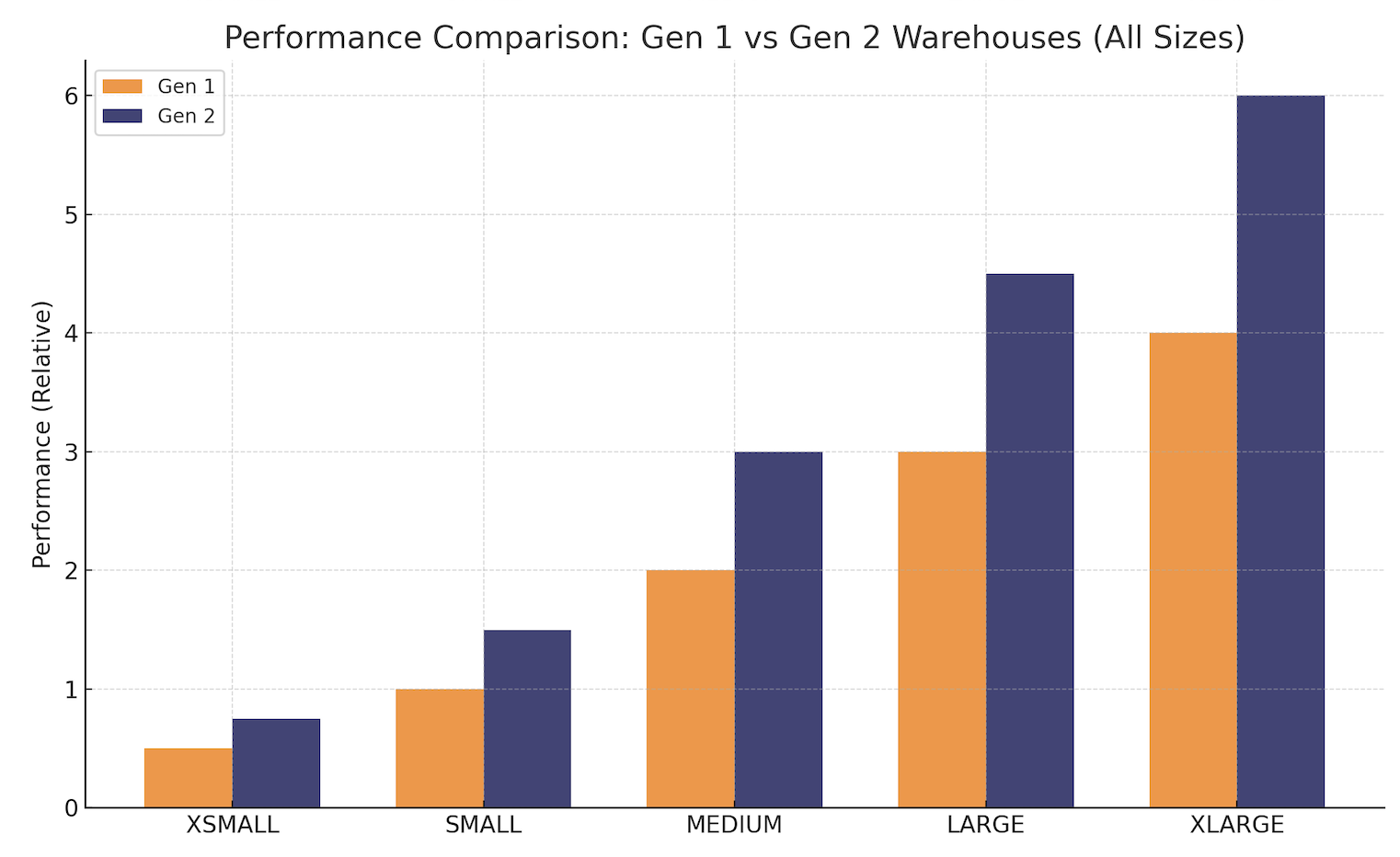
The chart above illustrates the improved performance benefit of Generation 2 over Gen 1 warehouses. It shows a comparison of the performance improvements on a range of warehouse sizes from XSMALL to XLARGE. Interestingly, as we increase warehouse size, the performance gains tend to increase.
Performance Vs. Throughput Vs. Cost
Before we continue with a comparison of warehouses, let’s consider the real underlying challenge we face. The diagram below illustrates the competing requirements of any data intensive platform.
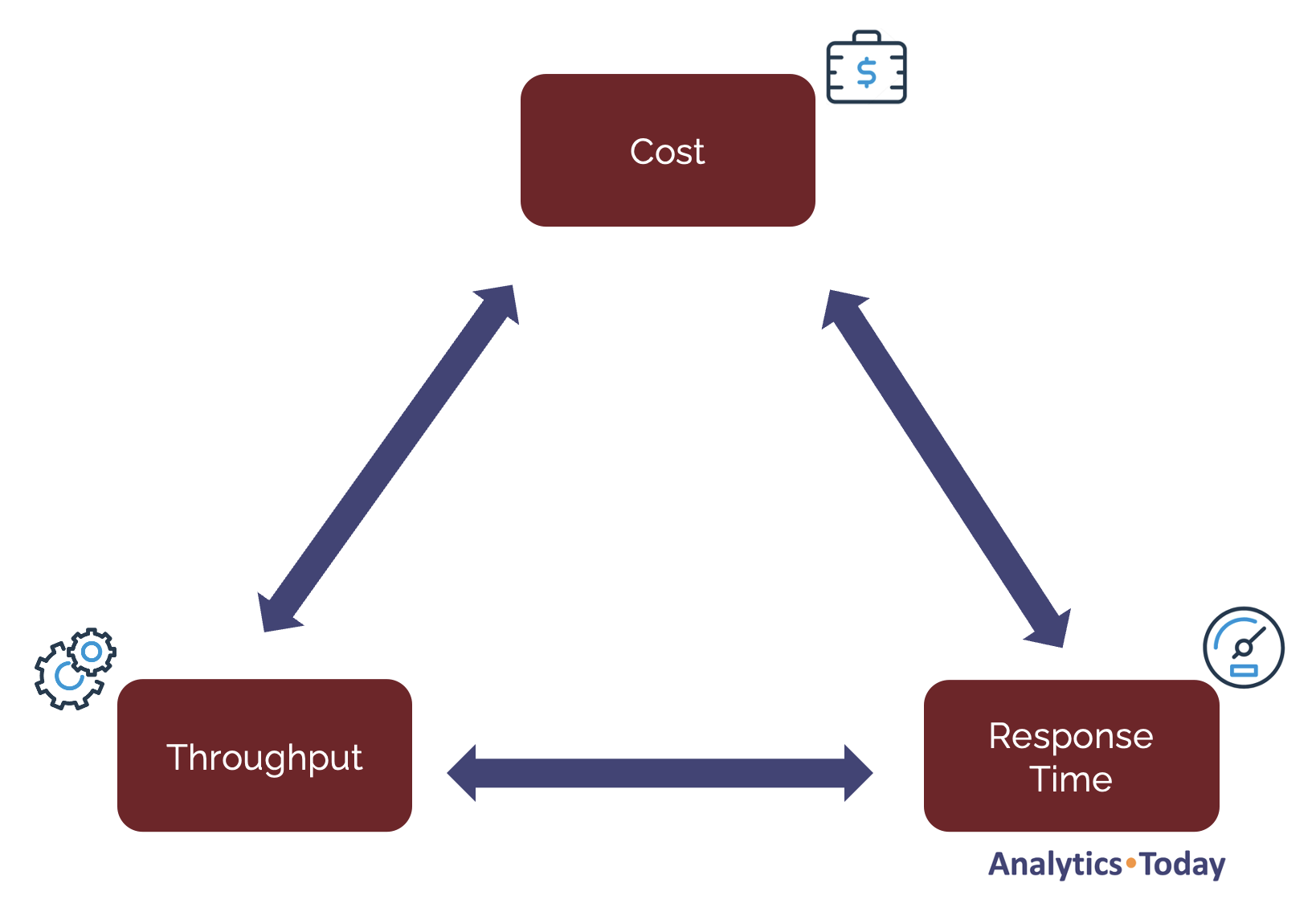
Effectively, on any given warehouse we have competing requirements of Throughput (the ability to process billions of rows) and Response Time (how fast we can quickly deliver results - typically to end-users). Throughput can be increased by scaling up to a larger warehouse, but response time for shorter running queries is seldom improved by scaling up.
Competing with both these requirements is the need to control costs, and it’s these three factors that made Snowflake Cost Management so challenging.
Ironically, Generation 2 warehouses deliver improved hardware performance, but the system appears tuned to make the greatest difference to large workloads, most frequently seen in batch transformation jobs.
Performance Benchmarks: How Much Faster Is Gen 2?
The short answer (which you’ll probably receive from any Solution Architect) is, it depends.
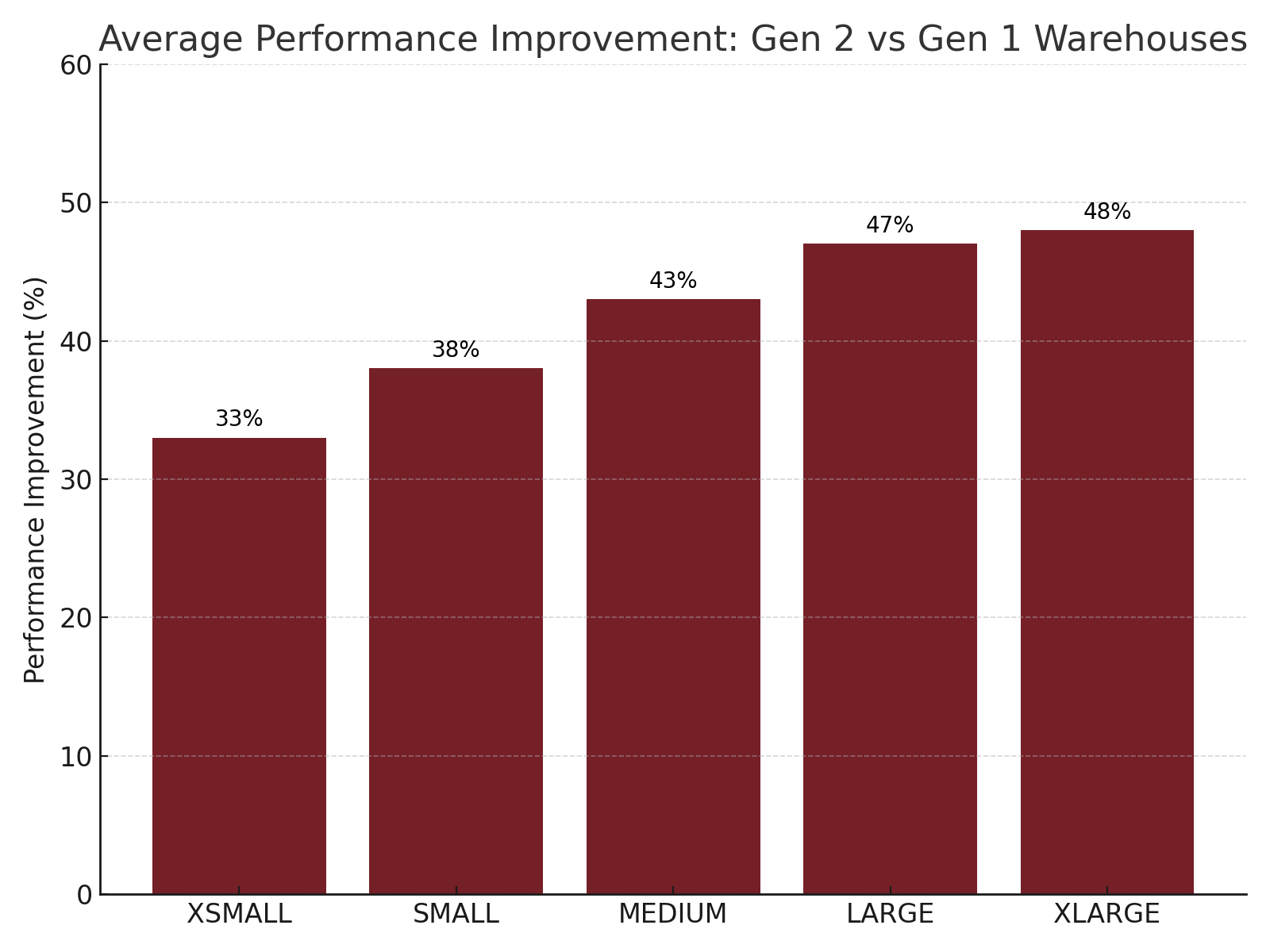
Snowflake is tuned to maximise throughput. That is, to process the largest volume of data (and therefore number of rows) as fast as possible. The chart above illustrates how this plays out with virtual warehouse size when executing queries on Generation 2 warehouses. It shows the average performance gain I’ve found when executing queries on Gen 2.
Notice that migrating from Gen 1 to Gen 2 warehouses on XSMALL delivers only a 33% improvement in individual query performance whereas an XLARGE produces a massive 48% improvement. This insight is critical because it highlights the fact you shouldn’t necessarily upgrade XSMALL warehouses for performance gains, whereas massive transformation tasks benefit from significant performance improvements.

Benchmark: Real-World Workloads (A Diverse Mix)
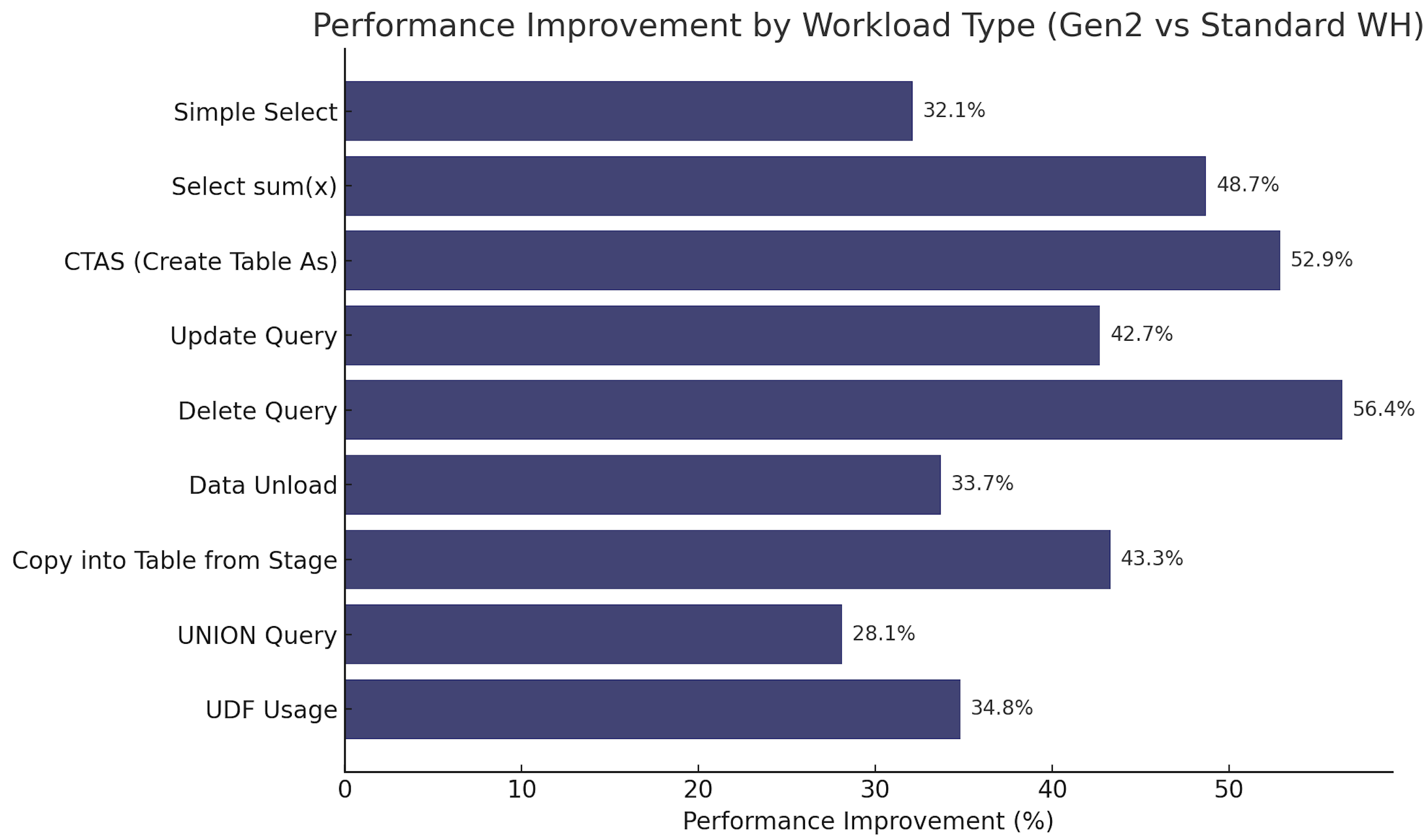
To get a sense of the performance gains, I tested a wider set of workloads that reflect what Snowflake engineers actually run every day. The dataset was from SNOWFLAKE_SAMPLE_DATA.TPCH_SF1000, and focused on the ORDERS table and related operations.
The workloads included BI-style SELECTs, DML operations like CTAS, UPDATE and DELETE, and copy/unload operations.
Results:
Analysis and Insights:
As you can see from the above table of results, Generation-2 Warehouses consistently delivered better runtimes across a very wide mix of workloads. Some of the most impressive gains came from CTAS operations (53% faster), and DELETE operations (56% faster).
Data movement operations like COPY and UNLOAD also saw improvements in the range of 33–43%, while recursive queries, materialized views, and window functions showed smaller but still consistent gains.
The key takeaway is that Gen 2 benefits not only analytical queries (eg. Select Aggregates at 49% faster), but also the broader spectrum of data engineering tasks, especially transformation tasks which include CTAS, UPDATE and DELETE operations.
Indeed, as we saw from the chart “Average Performance Improvement” above, as we increased warehouse size, the performance improvement gains where pronounced. This makes it particularly appealing for ETL pipelines that perform heavy lifting using INSERT, UPDATE and DELETE operations.
But There’s a Catch: Credit Burn
The Snowflake Service Consumption Table (1b) shows the credit rate charge for Gen 2 warehouses, which is slightly different for Azure compared to the AWS or GCP platform. For simplicity, the table below shows the average Generation 2 charge per hour which is around 30%-32% higher than Standard.
This means, to break-even (or save credits), your workload must ideally complete faster and then suspend.
Avg Gen 2 Credits per Hour for Warehouses
| Warehouse Size | Standard Credits | Avg Gen 2 Credits/Hr | % Increase |
| XS | 1 | 1.32 | 32% |
| S | 2 | 2.63 | 31.5% |
| M | 4 | 5.27 | 31.8% |
| L | 8 | 10.53 | 31.6% |
| XL | 16 | 20.73 | 29.6% |
| 2XL | 32 | 42.13 | 31.7% |
| 3XL | 64 | 84.27 | 31.7% |
| 4XL | 128 | 168.53 | 31.6% |
For long-running queries on larger warehouses, you may indeed use fewer credits. But if the time savings are only marginal, but you’ll be charged at 30% higher and sometimes you can end up paying more because the warehouse is active for nearly the same duration.
For example if we execute a sequence of statements on a MEDIUM size warehouse:
Standard WH: Executing a job which comples in 60 minutes = 4 credits.
Genration 2 WH: Executing the same job on Gen2 (assuming a 44% improvement) takes 34.2 minutes = 3 credits (44% faster and 25% cheaper)
However, if the job still took 60 minutes to complete it would cost 5.27 credits a 32% cost increase for zero performance gain.
Best Practices Before Switching
Before switching all your workloads to Generation-2 Warehouses, it’s important to test carefully. Benchmark your actual queries, measure credit consumption. Gen 2 isn’t universally better — it’s workload-dependent, and careful preparation avoids surprises.
The best practices include:
Workload Size: Given there’s less of a performance improvement on XSMALL warehouses, prioritise switching MEDIUM and larger warehouses to Generation 2 warehouses.
Check Utilisation: A warehouse with inefficient queries with significant waste will simply waste more money if executed on a most expensive warehouse. Consider the points in the Cost Tuning Guide before migrating warehouses to Gen2.
Perform A/B Testing: It’s relatively easy to switch from Standard to Generation 2 warehouses. Switch an existing warehouse to Gen2 for a week and compare the cost/performance difference. If the costs outweigh the performance gains, switch back.
Switch Vs. Scale Up: Since Gen 2 warehouses provide performance gains at an average 30% cost increase, it can be viewed as an interim step between warehouse sizes. Rather than simply scaling from a Standard SMALL to a MEDIUM, you could consider scaling from a Standard SMALL to a Gen 2 SMALL to see if the performance improvements are worth the additional cost. Remember, scaling from a SMALL to a MEDIUM doubles the cost rate, whereas going from Standard to Generation 2 only increases cost by around 30% but for a potentially larger performance gain.
Summary and Conclusion
Snowflake’s Generation-2 Warehouses are a genuine performance upgrade. Benchmarks show that they typically run workloads 20–50% faster, with some operations (like Stored Procedures) running almost twice as fast. The benefits are especially strong for heavy ETL, complex joins, and some procedural workloads.
However, the economics are not guaranteed. Because billing is based on time and credits, the faster runtimes of Gen 2 only reduce cost if they achieve enough of a performance gain. On AWS and GCP, that break-even point is about 26% faster; on Azure, about 20% faster. If your workloads don’t consistently hit that threshold, Gen 2 could cost more.
The smartest strategy is to test your own workloads, measure the cost impact, and then selectively move the right warehouses to Gen 2. In many cases, switching to Gen 2 at the same warehouse size a cost-effective way to improve performance rather than scaling up to the next size in Gen 1.

FAQs
Q: What’s the maximum size for a Gen 2 Warehouse?
Up to 4XL. 5XL and 6XL are Gen 1 only.
Q: Do Gen 2 Warehouses cost more per credit?
Yes. About 35% more on AWS/GCP, 25% more on Azure.
Q: How do I know if my warehouse is Gen 2?
Run SHOW WAREHOUSES. The RESOURCE_CONSTRAINT column will show STANDARD_GEN_2.
Q: Should I replace all warehouses with Gen 2?
No. Use Gen 2 selectively for heavy workloads, while keeping lightweight dashboards on Gen 1.
About the author
After 30 years of experience building multi-terabyte data warehouse systems, I spent five years at Snowflake as a Senior Solution Architect, helping customers across Europe and the Middle East deliver lightning-fast insights from their data.
In 2023, he joined Altimate.AI, which uses generative artificial intelligence to provide Snowflake performance and cost optimization insights and maximize customer return on investment.
Certifications include Snowflake Data Superhero, Snowflake Subject Matter Expert, SnowPro Core, and SnowPro Advanced Architect.
Comments
Join the discussionNo comments yet. Be the first to comment.


