

Snowflake Pricing Explained (October 2025): Compute, Storage, Serverless & Gen2 Warehouses

After 30 years of experience building multi-terabyte data warehouse systems, I spent five years at Snowflake as a Senior Solution Architect, helping customers across Europe and the Middle East deliver lightning-fast insights from their data.
In 2023, he joined Altimate.AI, which uses generative artificial intelligence to provide Snowflake performance and cost optimization insights and maximize customer return on investment.
Certifications include Snowflake Data Superhero, Snowflake Subject Matter Expert, SnowPro Core, and SnowPro Advanced Architect.
Written: September 2025 — including the latest Snowflake pricing model across compute, storage, serverless services, and newly released Gen2 warehouses.
Introduction to Snowflake Pricing
Ask ten Snowflake customers how much they pay, and you’ll get ten different answers. That’s not because Snowflake hides its pricing (it’s actually well documented) — it’s because the way you use Snowflake completely determines the bill.
Snowflake’s usage-based model is liberating. You don’t pay for hardware or licenses, and you can scale compute up and down instantly. But it also means one wrong decision — a warehouse left running, a poorly tuned query, or a serverless service you didn’t realize was enabled — can double your monthly costs.
So let’s break Snowflake pricing down into its key components: credits, editions, compute, Gen2 warehouses, serverless, storage, cloud services, data transfer, and capacity commitments.
Snowflake Credit Pricing: Cost Per Credit by Edition
Snowflake’s currency is the credit. Every warehouse you run or service you enable consumes credits. The price of each credit depends on four factors :
Edition (Standard, Enterprise, Business Critical, VPS)
Region (US vs non-US)
Cloud Provider (AWS, Azure, GCP)
Discounts (capacity contracts vs on-demand)
Each Snowflake Edition has a different on-demand prices per credit as follows:
Standard Edition: $2.00 – $3.10
Enterprise Edition: $3.00 – $4.65
Business Critical: $4.00 – $6.20
Virtual Private Snowflake (VPS): $6.00 – $9.30
Most US Enterprise customers land around $3–$4 per credit. Importantly, customers with large expected annual spend (typically $25,000 or more) are able to negotiate discounts on the per-credit price as part of their contract. Commitments can lower the effective rate significantly, especially for customers at scale.

Snowflake Editions and Feature-Based Pricing
Snowflake offers four main editions :
Standard Edition – the base plan, includes all core features, but this excludes advanced features only available on Enterprise Edition and above.
Enterprise Edition – adds multi-cluster warehouses (horizontal scaling).
Business Critical Edition – designed for industries with extreme security and compliance requirements.
Virtual Private Snowflake (VPS) – a dedicated instance for customers requiring full isolation.
Edition choice directly impacts per-credit pricing and available features. For example, an Enterprise customer might pay 30–40% more per credit than Standard, but gain workload isolation and scaling that reduce overall spend.
In practice, most large corporates choose Enterprise Edition. This is because it unlocks key features beyond Standard:
Performance and scaling – Multi-Cluster Warehouses, which automatically add or remove compute resources to deal with multiple concurrent workloads on the same warehouse.
Data protection – up to 90 days of Time Travel, Materialized Views, and Search Optimization Service
Data Security – Dynamic Data Masking, enterprise-grade Single Sign-On (SSO), and customer-managed keys.
Customers with very high security and business continuity requirements typically use Business Critical Edition, which adds features such as Tri-Secret Secure, private connectivity, and compliance support for regulations like HIPAA and PCI DSS.
By contrast, very few customers opt for Virtual Private Snowflake (VPS). VPS provides a fully isolated Snowflake environment on dedicated hardware for customers with the most stringent security demands, but the price point puts it out of reach for most organizations.
Snowflake Standard Edition excludes the advanced security and performance features available in Enterprise Edition and is mainly used as a development platform. While it can be cost-effective for non-production use, the lack of features such as Multi-Cluster Warehouses, extended Time Travel, and advanced security can limit its effectiveness for enterprise workloads.

Snowflake Pricing by Region and Cloud Provider
Where you run Snowflake also matters. Credit pricing varies depending on:
Region – US regions are cheapest; Europe and APAC regions often cost more.
Cloud Provider – AWS is usually the baseline; Azure and GCP can be more expensive depending on region .
Example: the same Enterprise credit might cost $3.00 in US East (AWS) but $4.65 in certain Asia-Pacific regions.
Takeaway: always provision Snowflake in the same cloud and region as your existing infrastructure to avoid both higher credit costs and data transfer fees.
Snowflake Compute Pricing: Virtual Warehouses and Credit Consumption
The heavyweight in any Snowflake bill is compute, usually 70–90% of total costs . Compute is consumed by virtual warehouses, which execute your queries and data pipelines.
Credits per hour scale linearly: X-Small = 1 credit/hour, Small = 2, Medium = 4, Large = 8 … all the way to 6X-Large = 512 credits/hour .
Snowpark-optimized warehouses add memory (great for ML workloads) but cost 1.5x more.
Here’s the catch: doubling your warehouse size doesn’t guarantee your query runs twice as fast. Poorly designed SQL or bad data modeling can eat credits without improving performance.

The above bar chart illustrates how the cost (credits per hour) doubles as you increase warehouse size. This often leads to the mistaken belief that the total cost will also double, but remember, each increase in size also doubles the compute resources and therefore the throughput. This often means your queries execute twice as fast, which means you get the same result in half the time for the same cost.
Snowflake Gen2 Warehouse Pricing and Performance
Snowflake’s Generation 2 Standard Warehouse (Gen2) is the next evolution of its compute engine. It’s still a Standard warehouse type, but it runs on upgraded hardware (Arm-based Graviton3 CPUs, DDR5 memory, larger caches) and a smarter query engine. The result is ~2.1× faster performance on core analytics workloads compared to Gen1 .
Key Benefits of Gen2 Warehouses
Faster queries – table scans, joins, aggregations, and DML operations all benefit from hardware acceleration.
Better concurrency – Gen2 can handle more simultaneous queries with less queuing thanks to smarter scheduling.
Drop-in compatibility – you don’t need to rewrite queries; switching to Gen2 is as simple as altering the warehouse settings.
Cost of Gen2 Warehouses
Gen2 Warehouses consume about 1.25–1.35× more credits per hour than Gen1 (depending on cloud). For example :
| Size | Gen1 Credits/hr | Gen2 Credits/hr (AWS) |
| X-Small | 1 | 1.35 |
| Small | 2 | 2.7 |
| Medium | 4 | 5.4 |
| Large | 8 | 10.8 |
| 2X-Large | 32 | 43.2 |
| 4X-Large | 128 | 172.8 |
Note: Generation 2 Warehouses currently supports sizes only up to 4XL (X5L and X6L are not available).
Limitations of Gen 2 Warehouses to Note
Higher cost per second – light, short queries may not justify the credit premium.
No Snowpark-Optimized support – Gen2 applies only to Standard warehouses.
When to Use Snowflake Gen2 Warehouses
Gen2 makes sense if your workloads are:
Scan-heavy queries (fact table joins, aggregations)
ETL transformations with lots of merges and updates
High concurrency BI dashboards
CPU-intensive functions (regex, math, ML UDFs)
For small, interactive queries or metadata-heavy tasks, the cost uplift may outweigh the benefits.
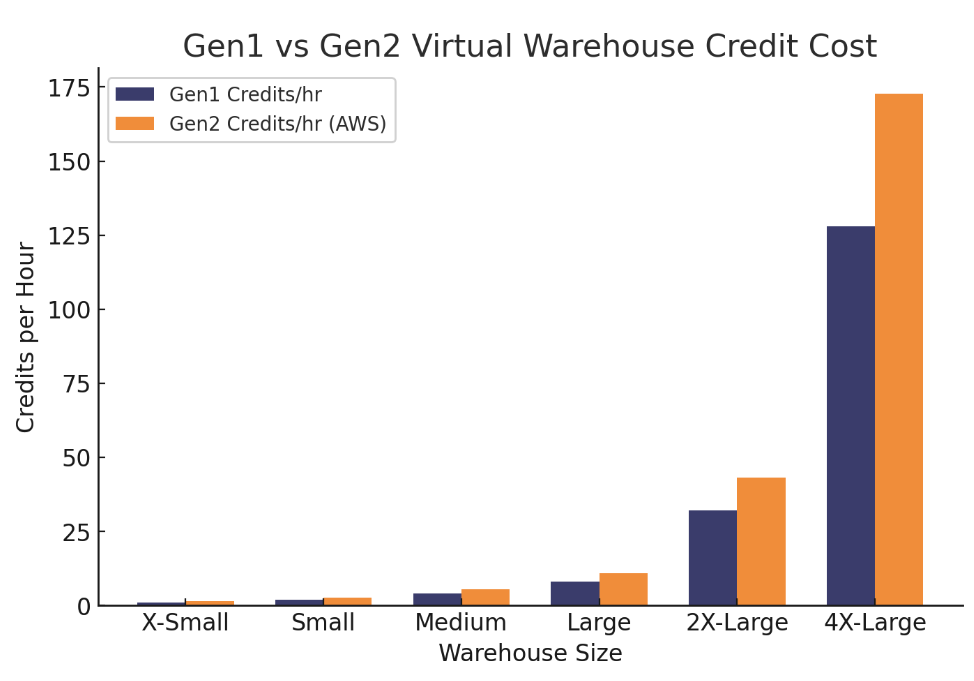
The diagram above illustrates the cost increase of using Generation 2 warehouses compared to Gen 1.
Snowflake Serverless Pricing: Pay Attention to Hidden Multipliers
On top of warehouses, Snowflake offers serverless services: Snowpipe, Search Optimization, Automatic Clustering, Materialized Views, Serverless Tasks.
Each has a credit multiplier. For example :
Snowpipe Streaming = 1x
Query Acceleration = 1x
Search Optimization Service = 2x
Materialized Views = 2x
That means if a warehouse consumes 10 credits, maintaining a materialized view could burn 20.
The problem? These charges run in the background. You don’t see them until the invoice arrives. If you don’t monitor closely, your bill will reflect maintenance work you didn’t realize was happening.

The donut chart above illustrates the typical breakdown of costs for most customers. This includes, compute (which takes up a majority of cost), then storage and other charges like Cloud Compute and cross region data transfer charges.
Snowflake Storage Pricing: Cheap but Easy to Waste
Storage in Snowflake is straightforward: about $23 per TB per month in US regions, more in others . Compared to compute, it’s cheap. But I often find customers spending thousands on unused tables, forgotten Zero Copy Clones, Stage Storage or incorrect use of transient data.
The danger isn’t the raw price per terabyte. It’s that wasted storage tends to drive wasted compute — because every query has to scan more partitions.
Quick win: run queries against SNOWFLAKE.ACCOUNT_USAGE.TABLE_STORAGE_METRICS to spot tables that cost a lot but haven’t been queried in months.
Snowflake Data Transfer Costs Explained
Data transfer charges is often misunderstood. These are applied by the Cloud Provider and billed to the customer by Snowflake as a pass-thru charge.
In-bound data loading – free.
Data transfer between accounts – transfers between accounts in the same Snowflake Region and Cloud Provider are free.
Querying data from Snowflake – free. This includes queries across regions. For example, a user in London can query data held in an account based in the USA without additional charges.
Cross-region or cross-cloud transfers – billed (especially with replication and data sharing).
Snowflake customers tend to deploy Snowflake in the same geographic region and cloud provider they use already. However, you need to be mindful of cross-cloud and cross-region ingress charges which can significantly add to overall costs for large frequent data transfers.
Typical costs per terabyte for cross-cloud or cross-region data transfers vary by provider, but generally fall in the range of $40–$90 per TB. At scale, even modest daily replication jobs can push transfer costs into thousands of dollars per month.
Snowflake Cloud Services Costs: The “Invisible” Layer
Snowflake’s cloud services layer covers everything outside raw compute: query compilation, authentication, metadata, cloning. By default, you don’t pay for this — unless it exceeds 10% of your compute usage .
For example:
If you burn 100 compute credits and 5 cloud services credits → you only pay 100.
If you burn 100 compute credits and 15 cloud services credits → you pay 105 (Snowflake rebates up to 10%).
Most customers never hit this threshold. But teams that run lots of tiny queries (think BI tools firing hundreds of SELECTs) often do. It’s a silent cost that creeps up if you don’t track it.
Snowpark Container Services Pricing
New as of 2024, Snowpark Container Services (SPCS) lets you run containerized workloads directly in Snowflake .
Compute pools, not warehouses, are used.
Example pricing (credits/hour):
CPU node S = 0.11
GPU node L = 14.12
For most customers, SPCS is niche — but for ML-heavy workloads it can consolidate pipelines and avoid external infrastructure costs.
How Snowflake Capacity Commitments Change Pricing
On-demand pricing (credits as you go) is flexible, but it’s also the most expensive option. If you’re spending more than $25k/year, Snowflake will push you toward a capacity commitment contract.
You prepay for a block of credits.
Discounts apply — bigger commitments, longer terms = deeper discounts.
But beware: if you overcommit, unused credits don’t carry over unless your next contract is equal or bigger. I’ve seen teams lose hundreds of thousands of dollars by “right-sizing” downwards at renewal time.
Snowflake Pricing - Serverless Compute Multiplier
By this point, you’ll have a huge amount of information about how Snowflake prices compute, storage and the various other options (like serverless compute). However, this is one detail you need to know about and that’s only exposed in the Snowflake Service Consumption Table.
This PDF document contains a 16 page breakdown of every charge by region and cloud provider, but the detail that’s often lost is in Table 5: Serverless Feature Table. The table below extracts some of the values to illustrate the point.
| Feature | Credit Multiplier |
| Data Clustering | 2 |
| Copy Files | 2 |
| Materialized View Maintenance | 2 |
| Query Acceleration Service | 1 |
| Search Optimization Service | 2 |
| Serverless Tasks | 0.9 |
The above table indicates the additional cost multiplier of the credit charge for serverless features. For example, the background Data Clustering feature will be charged at double the rate. So if the background compute service on a given day cost 5 credits, Snowflake would actually charge 10 credits.
Notice however the Serverless Tasks are billed at a 10% discount.
I’ve seen over time these charges being reduced, (for example when first launched Materialized View Maintenance multiplier was x 10, so be aware of these, especially when new features are launched.
Is Snowflake Expensive? The Real Answer
If you scroll through LinkedIn or talk to data engineers at conferences, you’ll hear two very different views:
“Snowflake is way too expensive — we had to cut back after the first bill.”
“Snowflake is actually cheap compared to what we used to run on-prem.”
I personally worked with one multi-million dollar Snowflake deployment that were struggling with limited capacity and high hardware costs on Netezza. Although they found it challenging to accurately predict and budget for spend, they found, overall the annual operational costs of Snowflake were significantly less than on Netezza.
The reality is simple: Snowflake itself isn’t expensive — wasteful usage is.
Why is Snowflake sometimes expensive?
The most common cost traps I see across projects:
Oversized or underutilized warehouses: Compute from credits running virtual warehouses often account for 80% of overall spend, and it must be the most important focus to eliminate waste. One of the single largest issues I’ve found is warehouse deployment. What starts with a well defined, well planned deployment plan quickly devolves into multiple warehouses per team and overall 100s of warehouses each running at less than 100% capacity.
Snowflake are working on a new feature, Adaptive Warehouses, which should help, but until this is widely adopted, many customers waste significant credits on under-utilized warehouses. In one case I had a Snowflake customer running a small automated job every five minutes 24x7 on a LARGE warehouse costing a maximum $210,000 per year. However, over-night and weekends when the server was largely empty, the machine resumed every five minutes and we estimated the waste as high as 50%. Simply moving this single job to an XSMALL warehouse saved over $100,000 per year.
Idle warehouses left running: Snowflake bills per second with a 60-second minimum . One customer I worked with accidentally created a series of huge (X3LARGE) warehouses with AUTO_SUSPEND=0 and MIN_CLUSTER_COUNT=8. Immediately after a single query was executed on each cluster (costing $4,000 per day), the clusters remained running and billing although idle. Several days later, the customer noticed the spike in costs, but not before they clocked up over $120,000 in spend.
Unmonitored serverless features: Background services like Search Optimization or Automatic Clustering run at 2x multipliers . On large or high-churn tables, the maintenance work can dwarf query costs.
Neglected storage policies: Keeping Time Travel at 90 days across every schema might sound safe, but it doubles your storage and locks in old partitions . Similarly, forgotten clones or stage files add costs with zero business value.
No governance controls: Without Resource Monitors or query timeouts, a rogue query can run for days. A single Cartesian join on an XL warehouse has cost companies more than an entire month of normal workloads .
Where Snowflake is actually cost-effective
Snowflake shines when you use its elasticity as designed:
Elastic scaling → pay nothing when idle, spin up in seconds when needed.
Capacity contracts → deep discounts once you commit spend.
Productivity gains → features like zero-copy cloning, automatic failover, and schema-on-read save engineering effort.
Unified platform → BI, ETL, and ML workloads on one service cut out integration overhead.
The bottom line
So is Snowflake expensive? Yes, if you ignore warehouse right-sizing, leave auto-suspend off, and enable serverless features everywhere.
But no, if you size carefully, monitor costs, and adopt Snowflake’s elasticity as a discipline.
To put it bluntly: Snowflake doesn’t punish you for using it — it punishes you for using it badly.
FAQs about Snowflake Pricing
Does Snowflake offer a free trial?
Yes, Snowflake offers $400 of credits and one month free when you sign up.
What is the minimum billing fee for Snowflake?
There’s no minimum spend for on-demand usage. Capacity commitments start at $25k/year.
How much does a Snowflake credit cost?
Depending on edition and region, between $2.00 and $9.30 per credit . Most US Enterprise customers pay ~$3–$4.
Does Snowflake charge for data transfer?
In-bound data loading is free. Transfers between accounts in the same region and cloud provider are free. Querying data across regions is also free. Cross-region and cross-cloud transfers incur charges, typically $40–$90 per TB.
What percentage of Snowflake cost is compute vs storage?
Typically 80–90% compute, 10–20% storage + services .
Is Snowflake cheaper than BigQuery or Redshift?
It depends. BigQuery charges per TB scanned, which can be cheap for ad-hoc analysis but costly for large joins. Redshift RA3 is closer in model. Snowflake is often cheaper when workloads are mixed (ETL + BI + data science).
How do Snowflake capacity discounts work?
If you commit to an annual spend of $25k or more, Snowflake offers discounted credit pricing. The larger the commitment (both in terms of money and contract length), the deeper the discount. But beware: unused credits don’t roll over unless the renewal is equal to or larger than the original contract.
What happens if I leave a Snowflake warehouse running?
Warehouses bill by the second, with a 60-second minimum each time they resume. If you forget to enable AUTO_SUSPEND, an idle warehouse can continue burning credits all night or over the weekend. I’ve seen customers spend over $100,000 from this mistake alone.
Which Snowflake edition do most customers use?
Roughly 80% of customers use Enterprise Edition, because it includes key features missing from Standard: Multi-Cluster Warehouses, longer Time Travel (90 days), Materialized Views, Search Optimization, Dynamic Data Masking, and enterprise-grade security (SSO, customer-managed keys).
Found this Article Useful?
At Analytics.Today we deliver on-site or remote training to teams. The feedback we’ve received from customers has been remarkable, and you too can benefit from both reduced cost and faster time to value by signing up for our training. Just visit: https://www.analytics.today/snowflake-best-practices-live-training and click on Request Availability.


