


TL;DR
Snowpipe and Snowpipe Streaming sound interchangeable, and the new version of the SnowPro Core exam (COF-C03) deliberately exploits that — pick the wrong one and you lose easy marks in Domain 3.0.
The single most reliable tell is files vs rows: if the scenario stages files, it's Snowpipe; if it ingests rows directly with no files, it's Snowpipe Streaming.
Watch for trigger words. "Stage", "CSV/JSON/Parquet", "micro-batch" point to Snowpipe. "Real-time", "row-by-row", "event", "message", or "without writing files" point to Snowpipe Streaming.
Snowpipe runs a
COPYcommand under the hood; Snowpipe Streaming does not use a stage orCOPYat all. That difference is the whole exam.

Introduction
Snowflake have quietly released an entirely new version of the SnowPro Core exam (COF-C03) and it's emphasis has changed from pure knowledge to testing scenarios. For example, "Your project needs to load near-real time JSON files for immediate processing. Which Snowflake feature would you recommend.
The question includes hints about the correct solution, but the potential answers include traps.
Here's another example: A question describes data arriving continuously, row by row, from an application — and the word "Snowpipe" sits in the answer list looking entirely correct. The candidate selects it, moves on, and never realises the question was quietly describing Snowpipe Streaming.
In my experience teaching Snowflake, this Snowpipe vs Snowpipe Streaming distinction catches out more people than almost any other pair in the data loading domain. The two features sit next to each other in the exam outline, they are both serverless, and both get described as "near real-time" in marketing material. That overlap is exactly why the exam likes to test them.
The good news is that the distinction is clean once you know what to look for. In this article I'll explain how each feature actually works, then give you a decision rule you can apply in seconds under exam pressure — so you stop guessing and start eliminating the trap answer with confidence.
What Snowpipe Actually Does (and Why It's Still COPY Underneath)
The first thing to understand is that Snowpipe is not a separate loading engine. It is a serverless wrapper around the same COPY INTO command you already use for batch loading. This is the detail that unlocks most exam questions.
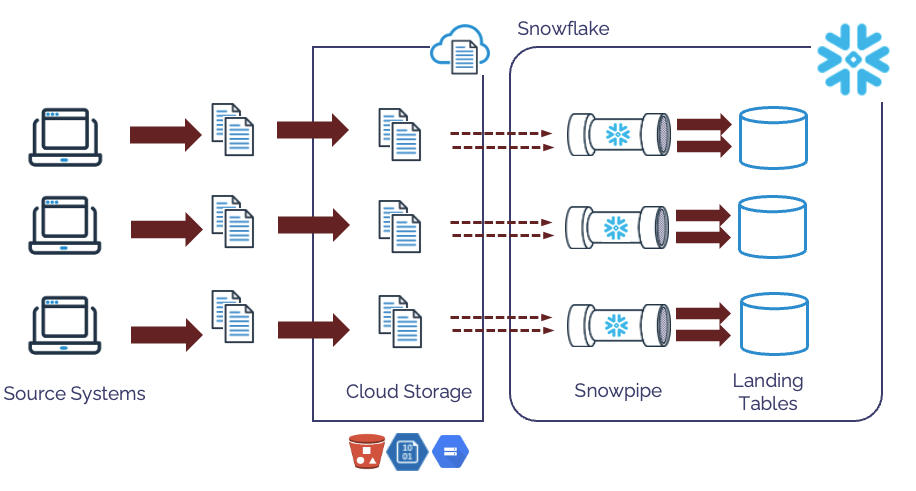
The diagram above illustrates how Snowpipe works in practice. Data files (eg. CSV, JSON, Parquet) — land in a stage backed by cloud storage. A cloud event notification tells Snowpipe a new file has arrived, and Snowpipe runs a predefined COPY INTO using Snowflake-managed serverless compute. There is no warehouse to size and no schedule to manage.
CREATE PIPE sales_pipe
  AUTO_INGEST = TRUE
AS
  COPY INTO sales
  FROM @sales_stage
  FILE_FORMAT = (TYPE = 'CSV');
Notice what the pipe definition contains: a stage reference, a file format, and a COPY INTO. That tells you everything about the workload Snowpipe is built for — files you do not control the arrival timing of. It loads them automatically as they appear, typically within about 60 seconds.
A few exam-relevant facts follow directly from this design:
It is file-based. No files in the stage means no Snowpipe.
Latency is roughly a minute, not sub-second. Snowpipe is "continuous" but not truly real-time.
It can be triggered two ways — cloud auto-ingest notifications, or a REST API call — but the outcome is the same load.
File sizing still matters. As I cover in Best Practices for Using Bulk COPY to Load Data into Snowflake, files in the 100–250MB range strike the best balance between latency and cost.
If you remember one thing, remember this: Snowpipe = files in a stage, loaded by COPY, automatically.
What Makes Snowpipe Streaming Different
Snowpipe Streaming solves a different problem entirely. It is designed for systems that produce a continuous flow of individual records — a Kafka topic, an IoT sensor feed, a custom application emitting events — where waiting for files to accumulate would defeat the purpose.
The diagram below illustrates this solution whereby messages arrive in a message broker (Kafka in this case) and rows are loaded directly into Snowflake.
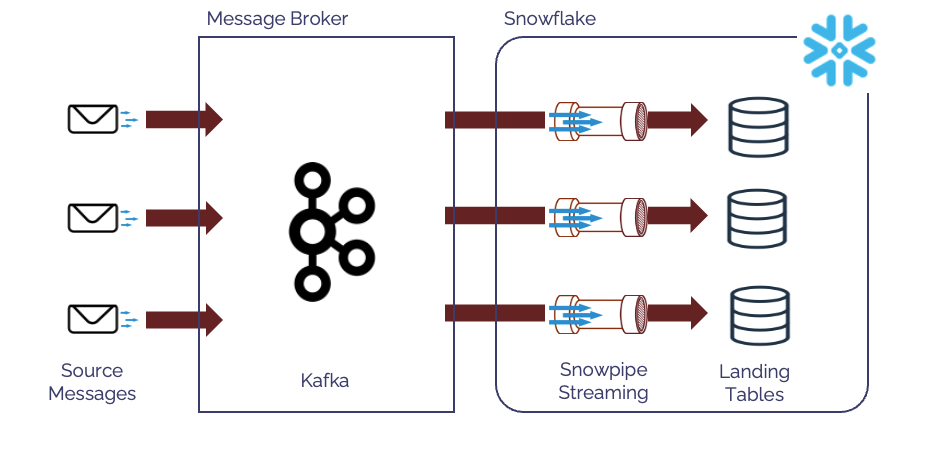
The mechanism is the key contrast. Snowpipe Streaming ingests rows directly into a table using an SDK. There are no staging files, no stage object, and no COPY command. Records are written row by row, which is why the latency drops from around a minute to seconds or sub-second.
That single architectural fact is the source of every exam question on this topic:
Snowpipe stages files, then loads them.
Snowpipe Streaming skips files completely and writes rows.
So whenever a scenario explicitly mentions ingesting data without writing files to a stage, or describes message- or event-based delivery, the answer is Snowpipe Streaming — even when "Snowpipe" is sitting right there as an option.

How Do You Tell Which One a Question Is Asking About?
This is where most marks are won or lost, so let's turn it into a rule. The exam telegraphs the answer through its vocabulary. Read the scenario and look for the trigger words before you look at the options.
Words that point to Snowpipe:
"Files arrive in a stage" / "files land in cloud storage"
"CSV", "JSON", "Parquet" — anything file-format-shaped
"Micro-batch", "automatically load files", "event notification"
"Near real-time" combined with a file source
Words that point to Snowpipe Streaming:
"Row by row", "individual records", "rowsets"
"Real-time", "sub-second", "low latency" as a hard requirement
"Event", "message", "Kafka", "streaming application"
"Without staging files" / "without writing files to a stage"
Here is the side-by-side I get students to memorise:
| Question signal | Snowpipe | Snowpipe Streaming |
|---|---|---|
| Source data form | Files in a stage | Rows / messages |
| Uses a stage? | Yes | No |
| Runs COPY under the hood? | Yes | No |
| Typical latency | ~60 seconds | Seconds to sub-second |
| Trigger | Auto-ingest or REST API | SDK from a client / connector |
| Best-fit scenario | Irregular file delivery (e.g. IoT files, app exports) | Continuous event/message streams (e.g. Kafka) |
Apply the table in order. Identify the form of the source data first. If it's files, you're in Snowpipe territory; if it's rows or messages with no files mentioned, you're in Streaming territory. Everything else — latency, trigger, cost — is confirmation, not the primary decision.

Why Does "Snowpipe" Look Right When It Isn't?
It helps to understand why the trap works, because that's what lets you spot it deliberately rather than by luck.
The distractor relies on three overlaps. First, the naming: "Snowpipe Streaming" contains the word "Snowpipe", so a tired brain pattern-matches to the shorter, more familiar option. Second, both are serverless — neither needs a user-managed warehouse, so a "no warehouse required" clue does not separate them. Third, both get called near real-time, so a vague mention of freshness doesn't help either.
The exam exploits all three at once. Consider a question like this:
An application emits customer events continuously and must be queryable within a few seconds of generation, with no intermediate files written to cloud storage. Which Snowflake feature should be used?
A. Snowpipe with auto-ingest B. Snowpipe Streaming C. COPY INTO on a scheduled task D. External table over a stage
Walk it through with the rule. "No intermediate files written to cloud storage" eliminates anything stage-based — that removes A, C and D in one stroke, because all three depend on files in a stage. "Within a few seconds" and "emits events continuously" both confirm the row-based, low-latency path. The answer is B, Snowpipe Streaming, and option A is the trap planted precisely because it shares a name.
The takeaway: when you see "Snowpipe" and "Snowpipe Streaming" together, treat it as a signal to slow down and find the files-vs-rows clue. The examiner put both there on purpose.
What's the Wider Ingestion Family the Exam Bundles In?
One risk once you've learned this distinction is over-correcting — seeing "streaming" everywhere and forgetting that Snowflake's Domain 3.0 ingestion family has several members. A clean answer means knowing what each neighbour does so you don't swap one trap for another.
COPY INTO (on a warehouse or serverless task) — scheduled batch loading. If the scenario says "every night", "on a schedule", or "batch", this is your answer, not Snowpipe. For the full picture of where each method fits, see my guide to the five data loading methods in Snowflake.
Streams and Tasks — change data capture and orchestration, not ingestion. A Stream tracks changes to a table; a Task schedules SQL. If a question is about processing data already loaded on a schedule, that's StreaStreams and Tasksms and Tasks, not a pipe.
Dynamic Tables — declarative, refresh-based transformation pipelines. When the scenario describes a target table that should automatically stay up to date from a query definition with a target lag, reach for Dynamic Tables.
A useful mental separation: Snowpipe and Snowpipe Streaming get data in; Streams, Tasks and Dynamic Tables move and transform data once it's there. If a question is about loading from outside Snowflake, you're choosing between the two pipes. If it's about reacting to data already inside Snowflake, you're somewhere else entirely.
One more practical angle the exam occasionally touches: cost. Snowpipe is billed per file processed plus serverless compute, which is why tiny files become disproportionately expensive. Streaming uses a different model better suited to high, continuous volume. If you want the current numbers, my Snowflake pricing breakdown covers serverless and ingestion costs in detail.
Ready to pass the SnowPro Core COF-C03 exam?
If this article has been useful, the course takes everything covered here — and the other four exam domains — and structures it into a complete exam preparation programme. It includes 300+ scenario-based practice questions with per-option explanations, so you are not just memorising answers but building the understanding the exam actually tests.
Conclusion
Snowpipe vs Snowpipe Streaming is a small distinction that pays back disproportionately on exam day, because the examiner reuses the same trap repeatedly across Domain 3.0. Hold onto three things and you'll get every one of them right:
Snowpipe loads files from a stage using COPY, automatically, at roughly 60-second latency.
Snowpipe Streaming ingests rows directly via an SDK — no stage, no files, no COPY — at seconds or sub-second latency.
When both appear as options, find the files-vs-rows clue before choosing. The shared name is the trap.
If you want to work through the full ingestion domain with this kind of clear, exam-focused breakdown, our instructor-led Snowflake training at Analytics Today covers data loading, automation, and the exact distractor patterns COF-C03 relies on, with hands-on practice questions.
Which Snowflake exam topics trip you up most? Tell me, and I'll tackle the trickiest pairs in a future article.
About the author
After 30 years of experience building multi-terabyte data warehouse systems, I spent five years at Snowflake as a Senior Solution Architect, helping customers across Europe and the Middle East deliver lightning-fast insights from their data.
In 2023, he joined Altimate.AI, which uses generative artificial intelligence to provide Snowflake performance and cost optimization insights and maximize customer return on investment.
Certifications include Snowflake Data Superhero, Snowflake Subject Matter Expert, SnowPro Core, and SnowPro Advanced Architect.
Comments
Join the discussionNo comments yet. Be the first to comment.


