


Snowflake has a proven track record of delivering unlimited processing and storage scalability, but customers are often concerned about the spiraling cost of cloud storage.
In this article, I'll explain how Stage Storage costs can unexpectedly balloon and share how you can identify and resolve the problem.
What is Snowflake Stage Storage?
The diagram below illustrates the process most Snowflake customers use to perform regular batch loads into Snowflake.
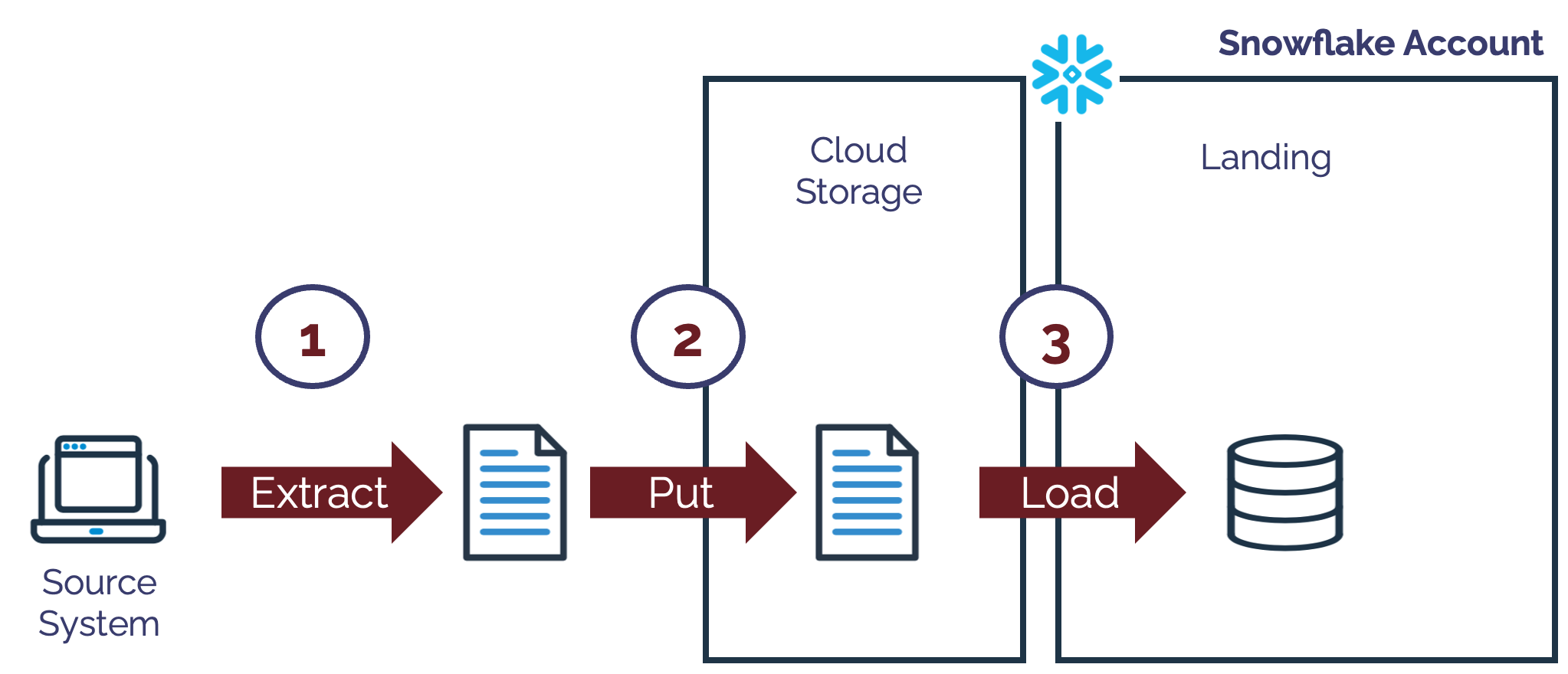
The stages include:
Extract Data: This involves extracting data from existing systems into data files.
Put Data: This means copying the data into Cloud Storage (if the source systems are not hosted in the cloud). This either uses the Snowflake
PUTcommand or a cloud provider utility.Load Data: This involves using Snowpipe or COPY to load data into Snowflake tables.
When data files are loaded to Cloud Storage, Snowflake provides two options to stage the data.
An External Stage refers to an area of cloud storage (for example, on AWS S3) used to store the data before loading it into Snowflake tables.
An Internal Stage refers to file storage within Snowflake. The cloud provider physically hosts this, but using an internal stage simplifies the data loading process, especially if there's no need to retain the data files once loaded.
For this article, the Stage Storage purely refers to the Internal Stage.
Why Use an Internal Stage?
There's no performance advantage over an Internal or External Stage, and most Snowflake deployments use both as needed. However, an internal stage is often used to host data files, while an external stage is most often used temporarily as a permanent record of data files - perhaps also to form a data lake.
Types of Internal Stage
To further complicate the issue, Snowflake provides three variations on an Internal Stage as illustrated in the diagram below.
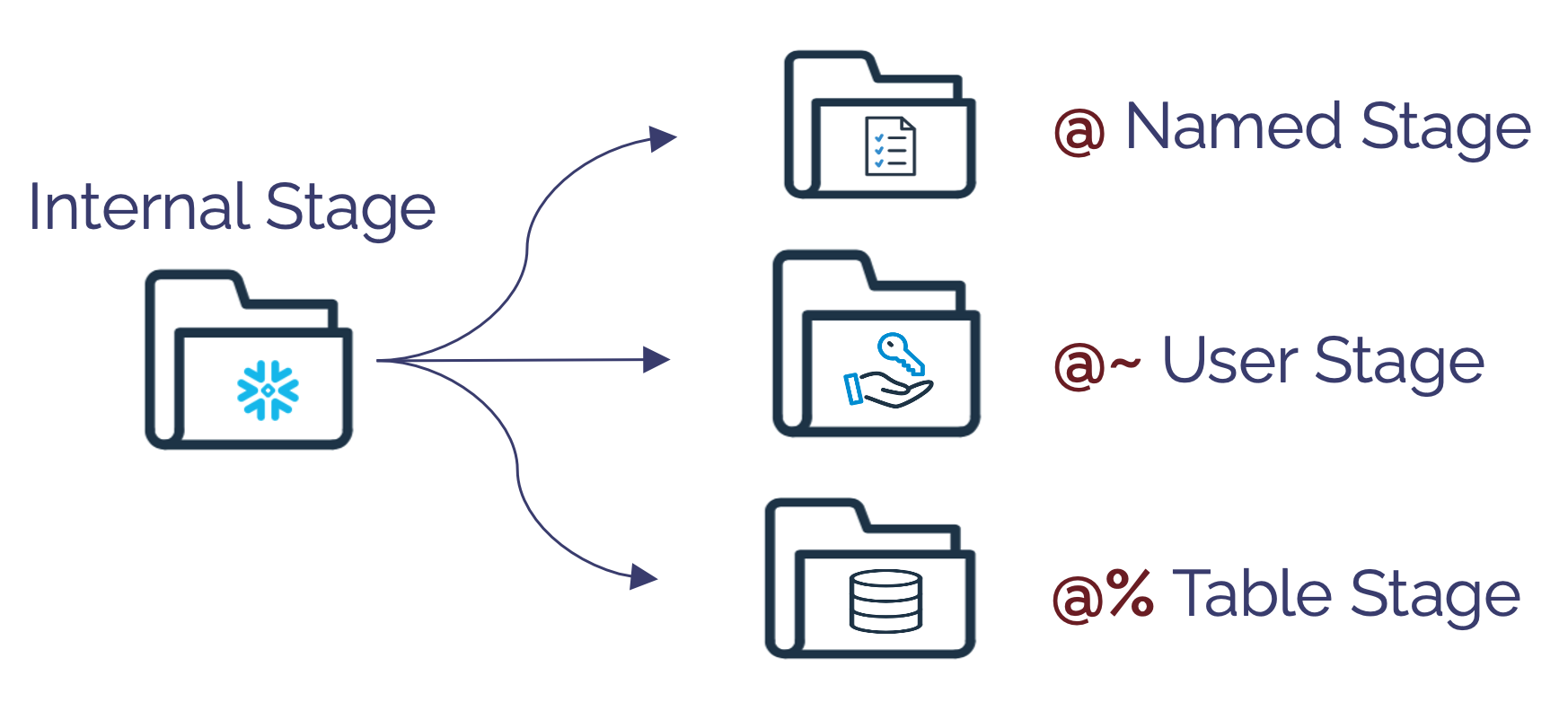
The stage types, however, are purely for convenience, and the Named Stage is the most commonly used as it gives the most flexibility. For example, the SQL statements below will PUT a data file into the SALES_STAGE and then COPY the data into the Snowflake table SALES.
put file://downloads/sales.csv
    @sales_stage;

copy into sales
from @sales_stage;

The Internal Stage Storage Problem
As indicated above, Internal Stages are primarily intended as a temporary storage area for data files before loading into Snowflake. However, I have frequently identified problems during Snowflake customer visits, such as customers not removing the data files once loaded, which leads to excessive storage costs.
Be aware also that, unlike Snowflake table storage, which uses columnar compression techniques to reduce data from up to 500MB to just 16MB, Stage storage uses simple row-level compression and has a much larger storage footprint.
The diagram below illustrates a situation I found at one multi-national Snowflake customer.
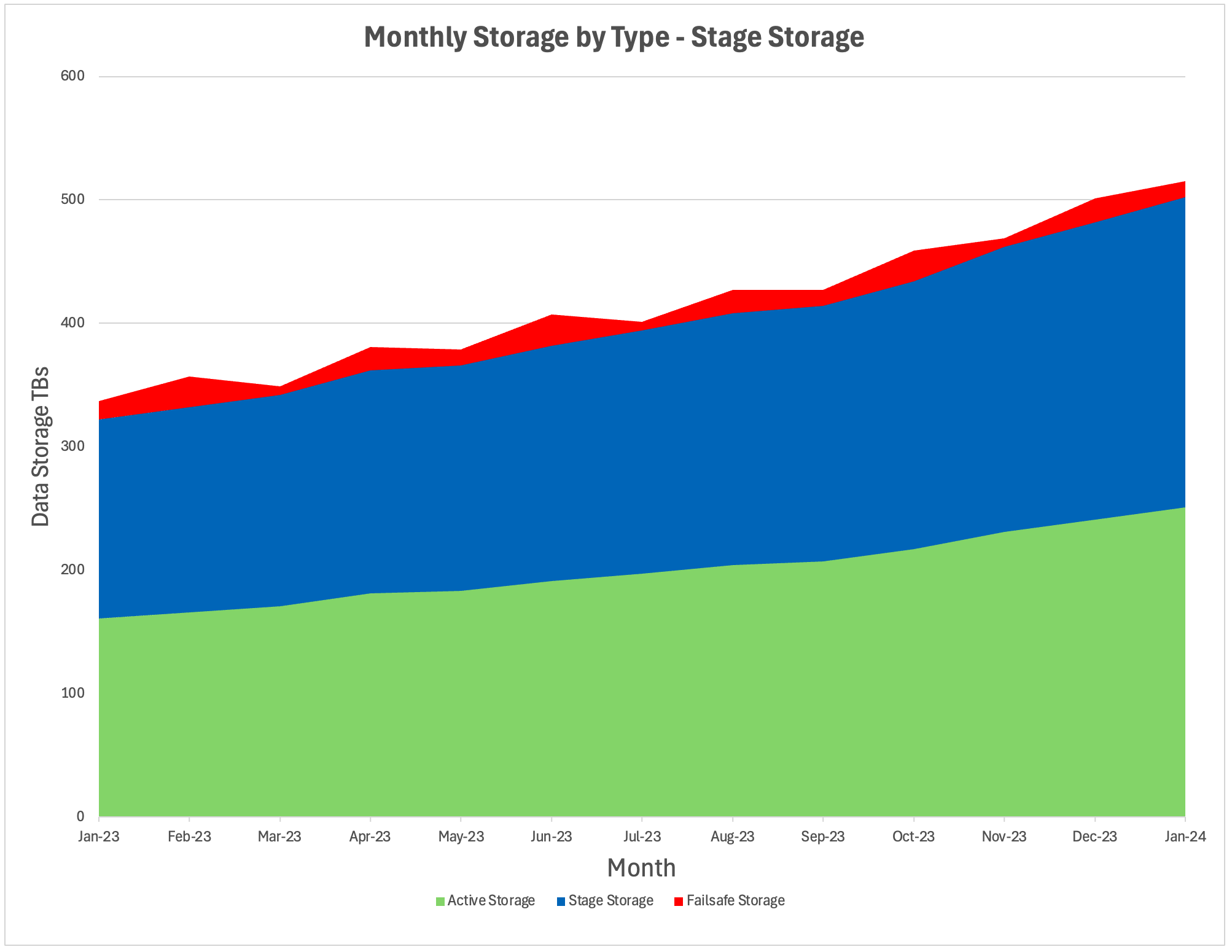
The graph above shows the total monthly storage broken by type. It shows that as of January 2024, the customer was using:
Active Storage: Around 220TBs of active storage. This represents the data storage for tables, including time travel.
Stage Storage: Around 250TBs of Stage storage. This is the storage used to stage internal data files.
Failsafe Storage: 3TBs of storage. This is the storage used to recover data deleted by accident.
Clearly, the customer used a regular load into an internal stage before copying the data into Snowflake but forgot to delete it afterward.
How to Identify a Stage Storage Issue?
The SQL statement below can be used to identify a potential storage issue around Stage Storage quickly.
select to_char(usage_date,'YYYYMM') as sort_month
,      to_char(usage_date,'Mon-YYYY') as month
,      trunc(avg(storage_bytes)) as storage
,      trunc(avg(stage_bytes)) as stage
,      trunc(avg(failsafe_bytes)) as failsafe
,      round(avg(stage_bytes) / avg(storage_bytes) *100,1 )     as pct_stage
,      round(avg(failsafe_bytes) / avg(storage_bytes) *100,1 )  as pct_failsafe
from snowflake.account_usage.storage_usage
group by month, sort_month
order by sort_month;
Effectively, if the stage storage percentage of active storage is above 3-5%, it's worth investigating and removing unnecessary data files.
How to Resolve a Stage Storage Issue?
The simple way to reduce stage storage is to remove the existing data files. However, if the system continuously delivers and loads data files, suspending the load may be sensible.
The following SQL commands will LIST and then REMOVE data files.
list @sales;
remove @sales;
However, you must also amend the existing load routine to automatically remove data files once successfully loaded.
The following SQL shows how this can be achieved:
put file://downloads/sales.csv
    @sales_stage;

copy into sales
from @sales_stage
   purge = true;
The above SQL command allows automatic removal of data files once loaded, which avoids unnecessary storage costs.
Conclusion
Snowflake has taken great pains to simplify the process of loading, processing, and analyzing vast data volumes and includes several options to load data using both external (eg. S3, Azure or GCP storage) and internal (Snowflake) stages.
Provided you understand how these are intended to be used, you can avoid excessive storage costs. However, it's worth checking your existing system to see if you, too, have a Stage Storage problem.

Takeaways
Internal Stages in Snowflake are designed for temporary storage of data files prior to loading into tables.
Unlike table storage, Stage storage is less compressed and can quickly accumulate large costs if data files are not removed.
Stage Storage should typically represent no more than 3–5% of your active storage footprint—anything higher is a warning sign.
You can use simple SQL queries to monitor and identify Stage Storage usage.
Implementing purge = true in your COPY statements ensures that data files are automatically deleted after loading, preventing unnecessary storage costs.
It’s worth regularly reviewing your system to ensure Stage Storage is being managed correctly.
Further Reading
About the author
After 30 years of experience building multi-terabyte data warehouse systems, I spent five years at Snowflake as a Senior Solution Architect, helping customers across Europe and the Middle East deliver lightning-fast insights from their data.
In 2023, he joined Altimate.AI, which uses generative artificial intelligence to provide Snowflake performance and cost optimization insights and maximize customer return on investment.
Certifications include Snowflake Data Superhero, Snowflake Subject Matter Expert, SnowPro Core, and SnowPro Advanced Architect.
Comments
Join the discussionNo comments yet. Be the first to comment.


